> ## Documentation Index
> Fetch the complete documentation index at: https://vibekanban.com/docs/llms.txt
> Use this file to discover all available pages before exploring further.
# Reviewing Code Changes
> Learn how to review and provide feedback on code changes made by coding agents
When a coding agent completes a task, it automatically moves to the **In Review** column. This is where you can examine the changes, provide feedback, and ensure the implementation meets your requirements.
## Opening the Code Review Interface
Click on any task in the **In Review** column to open it.
Click the **Diff icon** to view all the code changes made by the agent.
## Adding Review Comments
### Line-Specific Comments
To provide feedback on specific lines of code:
Find the line you want to comment on in the diffs view.
Click the **plus icon** (+) at the beginning of the line to create a review comment.
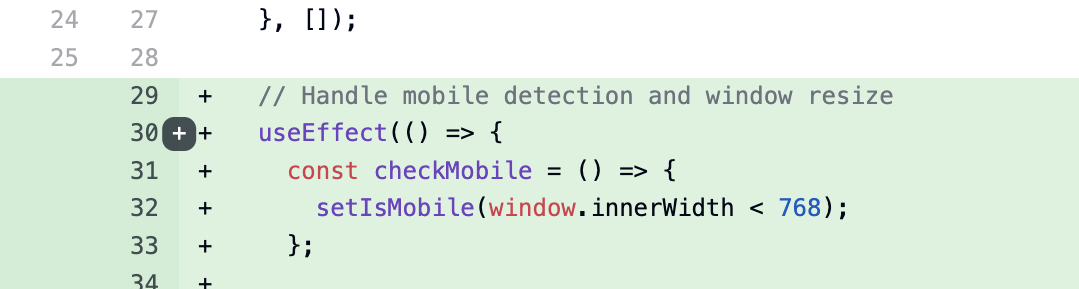 Enter your comment in the text field that appears. You can provide suggestions, ask questions, or request changes.
### Multiple Comments Across Files
You can create several review comments across different files in the same review:
* Add comments to multiple lines within a single file
* Switch between different changed files and add comments to each
* All comments will be collected and submitted together as part of your review
Review comments are not submitted individually. They are collected and sent as a complete review when you submit your feedback.
## Submitting Your Review
Click the **Send** button to send all your feedback to the coding agent.
All comments are combined into a single message for the coding agent to address.
Once submitted, the task returns to the **In Progress** column where the agent will address your feedback and implement the requested changes.
Enter your comment in the text field that appears. You can provide suggestions, ask questions, or request changes.
### Multiple Comments Across Files
You can create several review comments across different files in the same review:
* Add comments to multiple lines within a single file
* Switch between different changed files and add comments to each
* All comments will be collected and submitted together as part of your review
Review comments are not submitted individually. They are collected and sent as a complete review when you submit your feedback.
## Submitting Your Review
Click the **Send** button to send all your feedback to the coding agent.
All comments are combined into a single message for the coding agent to address.
Once submitted, the task returns to the **In Progress** column where the agent will address your feedback and implement the requested changes.