> ## Documentation Index
> Fetch the complete documentation index at: https://vibekanban.com/docs/llms.txt
> Use this file to discover all available pages before exploring further.
# Creating Subtasks
> Learn how to create and manage subtasks to break down complex work into smaller, manageable pieces
Subtasks allow you to break down complex tasks into smaller, more manageable pieces. Each subtask is linked to a specific task attempt and inherits the same project and branch context.
## Creating Subtasks
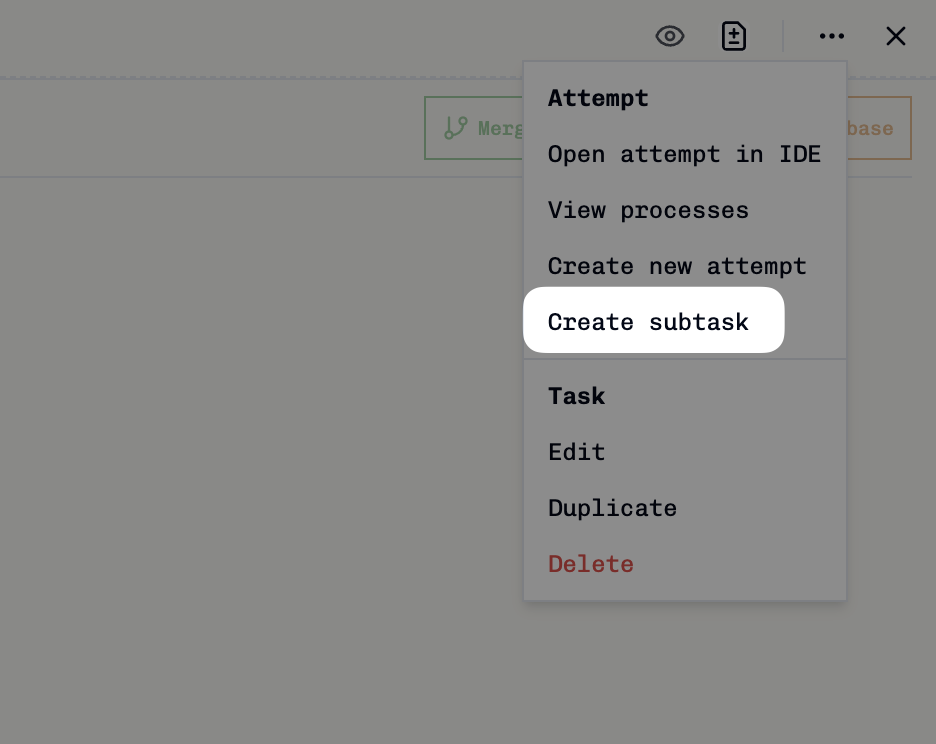 To create a subtask from an existing task attempt:
Open the task you want to create subtasks for.
Click the triple dot icon in the top right of the task, then select **Create Subtask**.
The task creation dialog opens with the parent task attempt and base branch automatically set. Add your subtask title and description.
Click **Save** to create the subtask. It will appear as a new task on your kanban board.
When you create a subtask, it automatically inherits the base branch from its parent task attempt, ensuring consistency in your development workflow.
## Viewing Tasks with Subtasks
To create a subtask from an existing task attempt:
Open the task you want to create subtasks for.
Click the triple dot icon in the top right of the task, then select **Create Subtask**.
The task creation dialog opens with the parent task attempt and base branch automatically set. Add your subtask title and description.
Click **Save** to create the subtask. It will appear as a new task on your kanban board.
When you create a subtask, it automatically inherits the base branch from its parent task attempt, ensuring consistency in your development workflow.
## Viewing Tasks with Subtasks
 When viewing a parent task, you can see its subtasks in the **Task Relationships** panel. This collapsible section shows:
* **Child Tasks** with a count (e.g., "CHILD TASKS (1)")
* Individual subtask titles with links to view them
* Easy navigation between parent and child tasks
This helps you track progress across all related work items and understand the task hierarchy at a glance.
## Viewing Subtask Details
When viewing a parent task, you can see its subtasks in the **Task Relationships** panel. This collapsible section shows:
* **Child Tasks** with a count (e.g., "CHILD TASKS (1)")
* Individual subtask titles with links to view them
* Easy navigation between parent and child tasks
This helps you track progress across all related work items and understand the task hierarchy at a glance.
## Viewing Subtask Details
 When viewing a subtask, the **Task Relationships** panel displays:
* **Parent Task** section showing the parent task title
* Direct link to navigate to the parent task
* Clear visual indication that this is a child task
* Context about the parent-child relationship
The subtask also shows its own **Create Subtask** button, allowing you to create nested subtasks if needed.
## How Subtasks Work
Subtasks in Vibe Kanban follow these key principles:
### Git Branching Workflow
Subtasks create their own feature branches that can work independently while maintaining connection to the parent task:
```mermaid theme={null}
gitGraph
commit id: "main"
branch feature/parent-task
checkout feature/parent-task
commit id: "Parent Task Start"
commit id: "Initial work"
branch feature/subtask-1
checkout feature/subtask-1
commit id: "Subtask 1: Backend API"
commit id: "API implementation"
commit id: "API tests"
checkout feature/parent-task
branch feature/subtask-2
checkout feature/subtask-2
commit id: "Subtask 2: Frontend UI"
commit id: "Component creation"
commit id: "UI styling"
checkout feature/parent-task
branch feature/subtask-3
checkout feature/subtask-3
commit id: "Subtask 3: Integration"
commit id: "Connect API to UI"
checkout feature/parent-task
merge feature/subtask-1
merge feature/subtask-2
merge feature/subtask-3
commit id: "Parent Task Complete"
checkout main
merge feature/parent-task
```
### Parent-Child Relationships
* Subtasks are linked to specific **task attempts**, not just tasks
* Each subtask knows which attempt created it
* Multiple subtasks can be created from the same parent attempt
### Branch Inheritance
* Subtasks automatically inherit the base branch from their parent attempt
* This ensures subtasks work within the same development context
* You can modify the branch when creating the subtask if needed
### Independent Task Lifecycle
* Subtasks appear as regular tasks on your kanban board
* Each subtask has its own lifecycle (To do → In Progress → In Review → Done)
* Subtasks can have their own task attempts and coding agents
When viewing a subtask, the **Task Relationships** panel displays:
* **Parent Task** section showing the parent task title
* Direct link to navigate to the parent task
* Clear visual indication that this is a child task
* Context about the parent-child relationship
The subtask also shows its own **Create Subtask** button, allowing you to create nested subtasks if needed.
## How Subtasks Work
Subtasks in Vibe Kanban follow these key principles:
### Git Branching Workflow
Subtasks create their own feature branches that can work independently while maintaining connection to the parent task:
```mermaid theme={null}
gitGraph
commit id: "main"
branch feature/parent-task
checkout feature/parent-task
commit id: "Parent Task Start"
commit id: "Initial work"
branch feature/subtask-1
checkout feature/subtask-1
commit id: "Subtask 1: Backend API"
commit id: "API implementation"
commit id: "API tests"
checkout feature/parent-task
branch feature/subtask-2
checkout feature/subtask-2
commit id: "Subtask 2: Frontend UI"
commit id: "Component creation"
commit id: "UI styling"
checkout feature/parent-task
branch feature/subtask-3
checkout feature/subtask-3
commit id: "Subtask 3: Integration"
commit id: "Connect API to UI"
checkout feature/parent-task
merge feature/subtask-1
merge feature/subtask-2
merge feature/subtask-3
commit id: "Parent Task Complete"
checkout main
merge feature/parent-task
```
### Parent-Child Relationships
* Subtasks are linked to specific **task attempts**, not just tasks
* Each subtask knows which attempt created it
* Multiple subtasks can be created from the same parent attempt
### Branch Inheritance
* Subtasks automatically inherit the base branch from their parent attempt
* This ensures subtasks work within the same development context
* You can modify the branch when creating the subtask if needed
### Independent Task Lifecycle
* Subtasks appear as regular tasks on your kanban board
* Each subtask has its own lifecycle (To do → In Progress → In Review → Done)
* Subtasks can have their own task attempts and coding agents